The Project Settings Dialog contains settings customized settings per project.
Project Settings Dialog
Figure: Project Settings Dialog
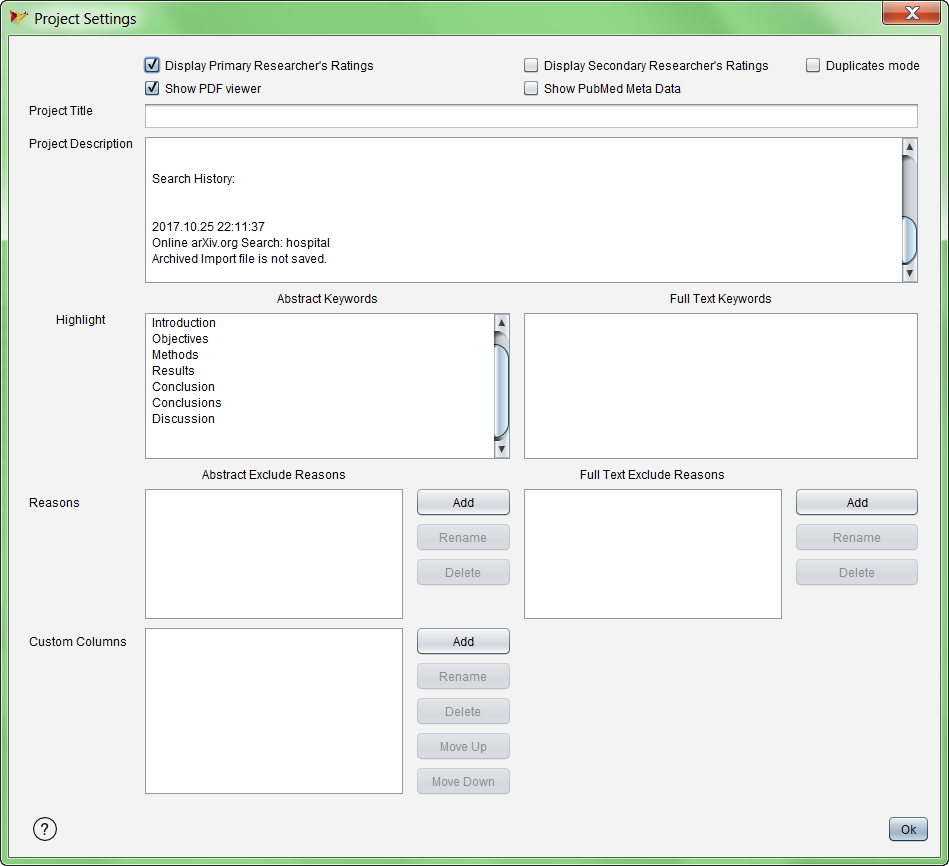
Buttons and fields on the Project Settings Dialog
| |
|
| Display Primary Researcher's Ratings |
Show the Primary Reviewer's Ratings for each reference in the reference
table in the Synthesis main window. |
| Display Primary Researcher's Ratings |
Show the Secondary Reviewer's Ratings for each reference in the
reference table in the Synthesis main window. |
| Show PDF viewer |
Show the PDF view in the Synthesis main window. |
| Show PubMed Meta Data |
Show PubMed meta data in the reference table in the Synthesis main
window. |
| Project Title |
Enter a descriptive name for the project |
| Project Description |
Enter a description for the project. Note that the result of searches
is automatically appended to this field whenever references are imported
[TBD] |
| Highlight - Abstract Keywords |
The terms and phrases listed here will be highlighted wherever they
appear in the abstract in the Synthesis main window and paper detail tab.
| Add button |
Enter a key word to highlight in abstracts |
| Rename button |
Modify the selected key word |
| Delete button |
Delete the selected key word |
|
| Highlight - Full Text Keywords |
The terms and phrases listed here will be highlighted in the PDF viewer
in the Synthesis main window.
| Add button |
Enter a key word to highlight in full texts |
| Rename button |
Modify the selected key word |
| Delete button |
Delete the selected key word |
|
| Reasons - Abstract Exclude Reasons |
The reasons listed here are available as options when excluding a paper
due to abstract.
| Add button |
Enter a phrase representing an exclude reason for
abstracts |
| Rename button |
Modify the selected exclude reason |
| Delete button |
Delete the selected exclude reason |
|
| Reasons - Full Text Exclude Reasons |
The reasons listed here are available as options when excluding a paper
due to full text.
| Add button |
Enter a phrase representing an exclude reason for full
texts |
| Rename button |
Modify the selected exclude reason |
| Delete button |
Delete the selected exclude reason |
|
| Custom Columns |
Custom columns are user-created columns containing data to help
classify and analyze references.
| Add button |
Add a new custom column |
| Rename button |
Modify the name of existing custom column |
| Delete button |
Delete the selected custom column |
| Move up |
Move the column up in the order shown on the Synthesis
main table |
| Move down |
Move the column down in the order shown on the
Synthesis main table |
|